
The text your family gets
This is the whole app, really. One text.
Example wording. On a normal day they just get "headed out" and "back, all good."
Tap what you want to see
How it works
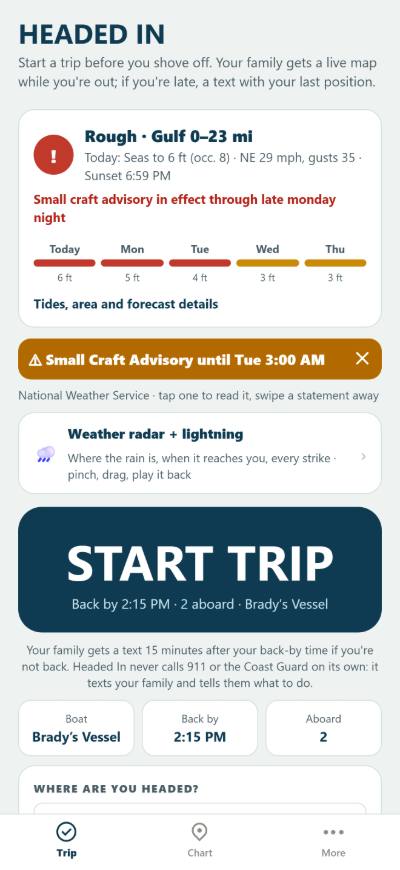
- STEP1Tap Start and say where you're headed.
An honest back-by time and one line in your own words, like "15 miles northwest out of John's Pass" or "paddleboarding the Treasure Island causeway until sunset." Then put the phone away. - STEP2Your family follows along on a live map.
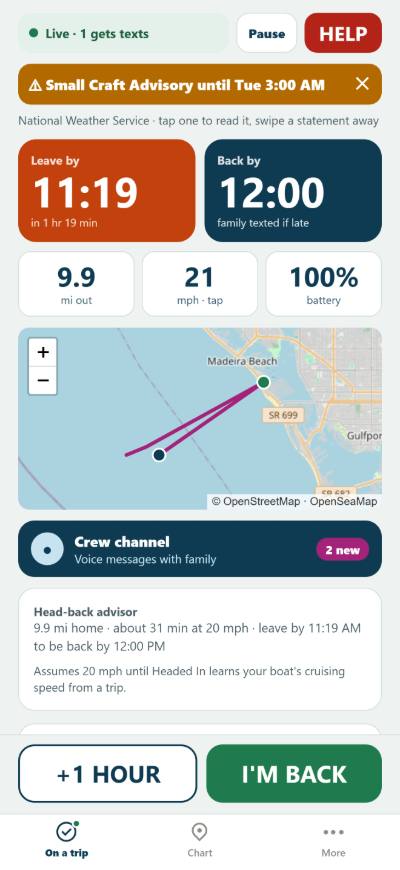
They get a private link by text. It opens in any phone's browser. No app, no login. - STEP3Running late? They get your last position and what to do.
The overdue check runs on our server, so it goes out even if your phone dies or loses signal.
Lightning near you
Open the app and the Check in screen shows a lightning line from NOAA's weather satellite: no lightning within 30 miles, or how far off the strikes are and which way. It runs a minute or two behind, and a satellite can miss strikes. If you hear thunder, head in.
Radar you can touch
Tap Weather radar on the Check in screen and it opens as a touch map. Pinch and drag, and play back the last 50 minutes. It shows lightning from NOAA's satellite and says about when the rain reaches you. It shows where rain is falling, not a promise about your spot. For warnings, trust the National Weather Service.
Don't take our word for it
Play a made-up trip: a normal day, a late one, a dead zone with a dead phone, and a HELP tap. Drag the clock and watch the map and the texts change.
See it workThe chart reads the bottom
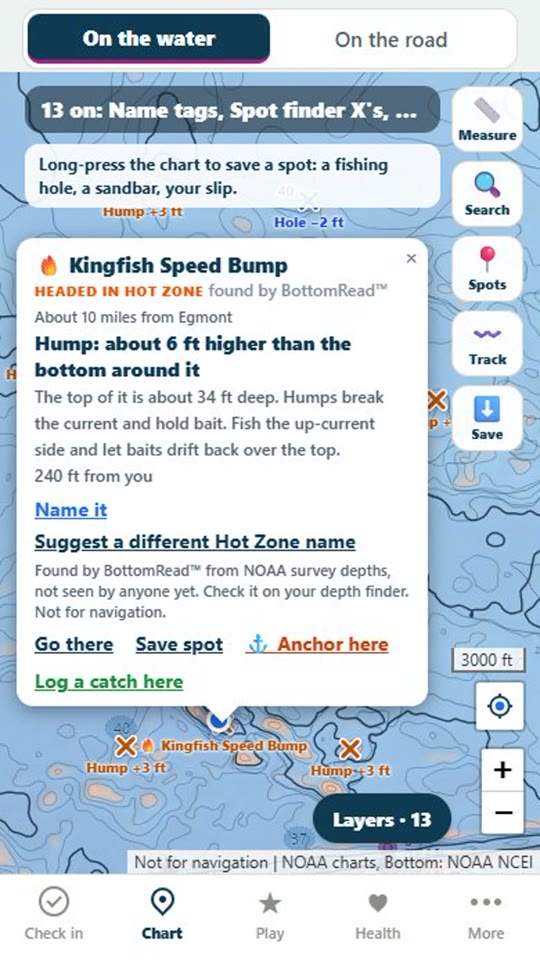
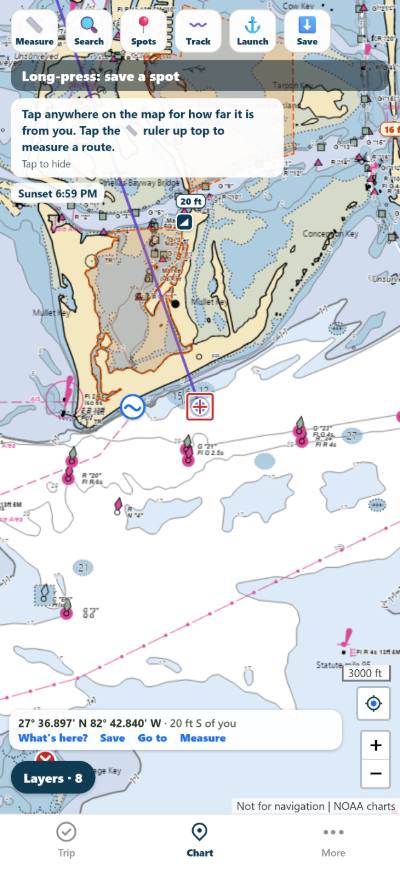
Picking a spot starts with the bottom. Headed In draws it from NOAA survey depths and points out the places worth a look, in plain words.
Spot finder
Marks on the chart say Ledge, Hump or Hole. Tap one to see how deep it is, why fish hold there and how to fish it. Then tap Go there, or Save it. BottomRead™ finds them. It reads NOAA's seafloor surveys for ledges, humps and holes, so check them on your depth finder. Chart too crowded? Tap any X to hide its name; tap it again to bring it back. That goes for reefs and wrecks too. The X stays, so you still see the spot. Your phone remembers.
Bottom contours
A depth line every 2 feet, and every foot when you zoom in. Shading makes ledges stand out. Orange marks where the bottom rises above the water around it. The depth under the bullseye shows as you move the chart.
Anchor helper
Tap Anchor here on any reef, spot or Spot finder find. It reads the live NOAA wind, the predicted tide current and the depth there. It tells you which one is in charge and when the tide turns. It puts a drop pin up-wind or up-current, and GPS checks your course as you come up to it. Then it says how much line to let out: 5 to 1, unless you change it.
Last time here
When the anchor goes in, tap I dropped it here. It saves where you dropped, plus the wind, tide, depth and line out. Once it settles, tap Held, Dragged or Missed the spot. Next time you anchor on that spot, it shows how it went and marks where you dropped before. It all stays on your phone.
Log a catch here
Every spot card has Log a catch here, next to Anchor here. It saves the catch with what it was doing at that moment: wind, tide, depth and water temperature. The card then shows Caught here, with the conditions each time. Copy for an AI turns your log into plain text, by spot name, never coordinates. It all stays on your phone, unless you turn on Give my catches to science. That switch starts off. It adds each new catch to one pooled set: the fish, the hour, the conditions and the rough area. Never your numbers, and never who you are.
Today here
Every find's card has a Today here line: a one-word read on that spot right now, like Fair. It's built from the live NOAA current at the nearest station and the latest nearby wind, scored for that kind of bottom. It says why, when the tide moves again, and which side to set up on. It lists what it's built from. Tap Best today on the chart for the top 8 Hot Zones within 40 miles, ranked by that read. Tap one to fly there. It's a read on conditions, not a promise of fish.
Hot Zones
493 of the best humps, holes and ledges are Headed In Hot Zones, found by BottomRead. They go all the way around Florida, from Perdido Key to the Georgia line. Each one has a name on everyone's chart and a flame: The Speed Bump, Grouper Grotto, The Showroom. Know a spot that should be one? Tap Suggest a name. You can name your own spots too, and those stay on your phone. Reef and wreck names start small. Tap one to open what's down there and how deep.
Works with no signal
Save the chart before you leave the ramp and the depths come with you. The detail is best out to about 20 miles off Tampa Bay.
A real screen recording. Tap a find, then Anchor here.
Plug it into your AI
Already plan with Claude, ChatGPT or Meta's Muse? Connect Headed In and your assistant gets what it can't find online: live Tampa Bay boating info.
Ask it like a dock buddy
"Closest ramp with a short line?" "Where can I get diesel near Pass-a-Grille?" "Is Fort De Soto packed right now?" It answers from live ramp waits, 62 public fuel docks and boaters' reports from the last few hours.
It drafts your float plan
Tell it the plan in plain words. It hands back a link that opens Headed In with the boxes filled in. You check it and start the trip yourself. No AI can start, change or end a trip.
It plans the whole day
Our Tampa Bay picks, story trails and Wind Phone booths, then a link that opens the plan right in the app.
It writes your log
After a trip, tap Write my log and get two to four plain sentences from the trip's facts. Spot names only, never coordinates, and only if you say yes.
Connect it: in Claude, Settings > Connectors > Add custom connector. In ChatGPT, Settings > Connectors (developer mode) > Create. In Meta's Muse, ask it to "create a custom connector for Headed In" with the link below (full description: headedin.com/openapi.json). Paste this:
https://headedin.com/mcp
The connector only shares public info: our picks, ramps, fuel docks and anonymous totals. It never sees your trips, contacts or where you've been.
On your calendar, on your schedule
Best days for you
Tell it your usual days off. It picks the three best of the next 30 for moon and tide, or for a low-water sandbar day, and adds the one you want to your calendar.
Plan ahead, in one tap
Plan today, tomorrow or the weekend. The whole outing goes on your calendar as one event with a reminder, and a text sends it to the crew.
Morning brief
One quiet note between 5 and 8 AM on the days you pick: moon window, morning wind, first tide turn and sunrise.
Reminders that matter
A tide alarm before high or low, and engine service reminders a week before the oil change is due.
Free forever
Headed In is free to use, with no premium tier. That includes the overdue text, the part that matters.
Your spots stay yours
Your spots, your tracks, your float plans, your catch log. Every trip lands in Trip history with its track. Every fish lands in your catch log, and At each spot shows how you did at each one.
Say it once on the way in. Type it or tap the mic on your keyboard: "30 grunts, 3 hogs, biggest hog 17." That's two catch entries, saved to the spot you're on with the conditions. No scrolling through a fish list with bait on your hands.
New phone? Your spots come with you. Sign in with your email in More (no password; we email you a 6-digit code) and we keep a copy of your saved spots. A new phone gets every one back. Your catch log and trips stay on the phone they were saved on.
The copy is only for you. It never goes on anyone's chart, and we don't share or sell it. Otherwise your spots stay on your phone, and we never learn where they are unless you choose. Your trip track goes only to the people you picked, so they can find you, and deleting the trip deletes it.
Run charters? Your marks are your living. We don't want them. We want you home.
Want a fishing log that stays yours? The Honey Hole is free on this site. Log a fish and the moon, the NOAA tide, the pressure, the wind and the water temperature fill in. Your log and your spots stay on your phone.
Built in Tampa Bay
Designed on the water in Tampa Bay, for the people who boat here. Free, local, and built by a St. Pete nurse whose family watches the horizon too.
Privacy, in plain English
Your location is shared only during a trip, and only with the people you choose. We don't sell data. There's nothing to sell.
FAQ
Does Headed In call the Coast Guard?
No. It texts your family with your last position and what to do next. They're the ones who know you, your boat, and where you launched.
What's a float plan, and why does it matter?
It's telling someone where you're going and when you'll be back. When you start a trip, Headed In asks "Where are you headed?" Your answer shows on your family's map and goes into the overdue text, because "where were they headed?" is the first thing the Coast Guard asks. A good plan says where you launched, where you're going, and anything that might change it: "Out of John's Pass, 15 miles NW to the reef, back through the pass by 5."
Kayaks and paddleboards too?
Yes. Anything you take out on the water works the same way: start at the launch, say where you're headed, and keep the phone in a waterproof pouch. Paddlers often stay closer to shore, which usually means better signal.
Why not just use the iPhone's built-in Check In?
Apple's Check In is a good feature if you and your contact both have it: it needs iOS 17 on both phones. Headed In works when your family is on any phone (the map opens in a browser, no app or login), asks where you're headed and when you'll be back, knows about kayaks and paddleboards and every public launch in Florida, and sends the overdue text from our server, so it still goes out if your phone dies.
Is it really free?
Yes. Headed In is free to use, with no premium tier.
Do I have to set up the family texts?
No. The chart, weather, tides, games and stories all work without anyone getting a text. Texts only go out when you start a trip and pick who gets them. Coming in the next update: My Day follows your whole day on your phone and builds the story and a flyover that night. Nobody gets a text.
What happens when I'm overdue, exactly?
15 minutes after your back-by time with no check-in, your family gets a text with your last known position, your boat, how many are aboard, and a link to your live trip map. If there's still no word 45 minutes later, they get a firmer second text with everything a 911 or Coast Guard dispatcher will ask for. Before any of that, your phone reminds you, so a simple "running late" never alarms anyone.
What if I lose cell signal offshore?
Your family still sees your last reported position on the map, your phone keeps recording, and the track uploads when signal comes back. The overdue text doesn't need your phone. Full details: when you lose signal.
Does it drain my battery?
It only uses GPS during a trip you start, and it checks in less often when your battery runs low. A long day on the water still uses battery, so start charged.
Will you see my fishing spots?
No. Saved spots, routes and your catch log are kept on your phone. If you sign in to keep a copy of your spots, that copy is only for you: never on a chart, never shared or sold. (If you ask the AI to write your trip log, it gets the names of spots you passed, never where they are.) During a trip, the people you picked see where the boat is, and nobody else. We don't sell or share tracks, and we never turn anyone's trips into a map of spots. The only thing we count is how many boats are at the public sandbars, as a number, so people can see how crowded they are.
What do you do with my location?
It's shared only during a trip, and only with the people you choose. That's it. See the Privacy Policy.
iPhone only?
iPhone first. Android is planned: get on the Android list. Your family can be on any phone: the map opens in the browser.
Someone I know is overdue. What do I do?
Read our guide: Someone's overdue. Now what?
About the texts
- Who sends them
- Headed In, on behalf of a boater who added you as a trip contact.
- How you opt in
- The boater asks you first, then adds your mobile number in the app. You get one text asking you to reply YES. Nothing else is sent unless you reply YES.
- What you get
- A text with a map link when the boater heads out, a text when they're back, and an alert if they're overdue, need help, or their phone battery is low. Usually 2 to 4 texts per trip. Never marketing.
- Stop or help
- Reply STOP to any text to stop all texts. Reply HELP for help. Message and data rates may apply.
- Your number
- We don't sell or share phone numbers or opt-in data with anyone for marketing. See the Privacy Policy and Terms.
Free on the App Store.
For iPhone. Add your family once, then take it out on a calm day first.
Get it on the App StoreOr open it in your browser: the chart, forecasts, Play and the planning tools. Check-ins need the phone app.